Monday, November 24, 2014

Data Mining in Excel Part 30: Cross-Validation

Today, we're going to talk about the final tool in the "Accuracy and Validation" segment of the Data Mining Ribbon, Cross-Validation.
Cross-Validation
Imagine you have a data set with 10,000 rows.  Then, you randomly assign 1,000 rows to each of 10 buckets.  Next, you create a model using 9 of the buckets (9000 rows) as training data and 1 bucket (1000 rows) as testing data.  Then, you repeat this process for the using each of the remaining 9 buckets as testing data.  After this is done, you have 10 models using parts of the same data set, which means you have 10 different predictions for each row.  Then, you can compare the predictions and see how much they deviate from each other.  If they are all very close to each other, then the model is "good".  If some of them are very far apart, then the model may not be appropriate for the data you have.  You can also compute a single prediction by combining all or part of your 10 predictions into a single value.  This process is called Cross-Validation.  For more information, read this.  Let's see it in action.
Select Structure
First, we need to select the structure or model we would like to use.  Unlike the previous methods, this technique can technically use Association Rules Models as well.  However, the structure must have a variable with the "Predict" flag, which doesn't come from the Association Rules Model.  Therefore, we're not sure how you could use this technique on an Association Rules Model.  Let's move on.
Select Parameters
Next, we need to select our parameters to be used.  Fold Count refers to the number of partitions we create using the data.  In our earlier example, we used 10.  You also need to define how many rows you would like to be used for consideration.  The larger the number of rows, the longer the algorithm will take.  Then you need to define with value you are looking, Purchased Bike = Yes in our case.  Finally, you need to decide what probability defines a "True".  These algorithms don't actually assign a True/False value to the field, they assign a probability.  The higher the probability, the more likely the customer will buy a bike.  For now, let's just set this value at .5, like the flip of a coin.  Finally, let's check out the results.
Prediction Summary (.5 TT)
We rearranged the tables to make it easier to read.  Here, we have tables telling us the average number of true positives, false positives, true negatives, and false negatives across the 10 folds, as well as the associated standard deviations.  We want to have high numbers for True scores and low number for False scores.  We also want standard deviations to be small because this implies that the models are robust, i.e. aren't heavily influenced by differences in the data.  Looking at this carefully, we see that the Naive Bayes Model performs well on all fronts and has a pretty low standard deviation.  This, combined with the fact that this model also performed well on the other previous Model Validation tests, leads us to believe that the Naive Bayes Model is a good fit for this type of analysis.  However, this is just our opinion and is definitely up to interpretation.  Let's check out the next set of metrics further down the sheet.
Metric Summary (.5 TT)
Here, we have 3 metrics displayed, Log Score, Lift, and Root Mean Squared Error.  We won't go into detail about what these metrics mean.  If you want to know you can read Log Score, Lift, and Root Mean Squared Error.  Basically, we want Log Score and Lift to be high, while keeping Root MSE low.  Of course, we also want the standard deviations to be small.  Personally, we don't feel like these metrics are as important as the prediction values we saw previously.  So, we'll just use them to confirm that the Naive Bayes Model is reasonable, and they do.  Before we finish, let's check the Prediction Summary for different values of Target Threshold to ensure stability of our Naive Bayes Model.
Prediction Summary (.2 TT)
Prediction Summary (.8 TT)
By looking at these charts, we see that the Naive Bayes Model seems reasonable in all cases.  This leads us to conclude that the Naive Bayes Model is the model we will use to predict which customers will buy our bikes.  Stay tuned next week where we'll be talking about our final topic, Querying your Models.  Thanks for reading.  We hope you found this informative.

Brad Llewellyn
Director, Consumer Sciences
Consumer Orbit
llewellyn.wb@gmail.com
http://www.linkedin.com/in/bradllewellyn

Monday, November 17, 2014

Data Mining in Excel Part 29: Profit Chart

Today, we're going to talk about the next in the Microsoft suite of Model Validation tools, Profit Chart.
Profit Chart
The Profit Chart is an amazing tool that allows you to mathematically decide how many people to market to.  Imagine that you're trying to sell bikes to a list of 50,000 prospective customers.  You already have some models that tell you how likely each customer is to buy a bike.  So, which ones do you send advertisements to?  Obviously, you want to send flyers to customers that are "likely" to buy.  The question is, "How likely does that customer need to be in order for them to worth marketing to".  Let's say it costs $10 to send a flyer to someone and you make $15 if they buy a bike.  If only 20% of the customers will buy, then you will spend $10 per person for an average of $3 profit because only one out of every five will.  You'd lose money that way.  However, if you advertise to a group of people where 80% of the customers will buy, then you make an average of $12 profit. Now you're making money.  The profit chart allows you to input your cost parameters for your advertising campaign and it will tell you which people you should advertise to.  For more information on Profit Charts, read this.  Let's see it in action.
Select Structure
First, we need to select our structure or model.  Just like the previous two posts on Accuracy Charts and Classification Matrices, this chart cannot be used on models that were built using the Association Rules or Time Series algorithms.  Let's move on.
Select Parameters
Here, we can input the cost of our campaign.  First, we need to decide which value we're looking for.  In our case, we want to find people who will buy a bike.  Next, you input the number of potential customers, 50000 in our case.  Then, you input the fixed cost of creating the campaign, $5000 for us.  Now, you input the individual cost to advertise to a person, $10 in this example.  Lastly, you need to define how much money you would make it you sold a bike, $15 per bike.  This is a great start.  However, in the real world, we get discounts for dealing in bulk.  So, what if an advertiser will give you a discount to create a certain amount of advertisements.  If we click the "..." beside the "Individual Cost" box, we can input that.
Individual Cost (Advanced)
Here, we're saying that the first 1000 flyers will cost $10 per flyer, the next 9000 will cost $7.50 per flyer and everything above that costs $5 per flyer.  Let's keep going.
Select Data Source
Finally, we need to choose our data source.  As usual, we strongly advise against testing the model using the same data that you used to train the model.  Let's check out the results.
Profit Chart (Purchased Bike)
This chart requires a little background.  Imagine that you used these algorithms to assign a probability to each prospective customer (which we haven't learned how to do yet).  This probability tells you how likely that customer is to buy a bike from you.  Then, you order these customers according to those probabilities, highest probability to lower probability.  This ordering is how the horizontal (X) axis of this chart works.  Let's pick 30%.  This point says that if you advertised to the top 30% of your prospective customers as defined by this model, you would make Y dollars.  So, the goal is to see what percentage of our population we need to advertise to in order to maximize our profit.  We see that the blue line (random) is basically the worst performer out of the bunch, followed closely by the red line (Decision Tree Model).  The rest of the models seem to be pretty tightly packed.  The algorithm gives us an easier chart to read.
Maximum Profit per Model
This table was originally on a single line in the Excel worksheet.  We moved it around for easy readability.  We see that the best model is the Neural Network (again).  Followed closely by each of the other models.  This table also tells us what percentage of the population we would have to advertise to in order to make that amount of money.  Compare the Neural Network Model (Middle Right) to the Neural Network 10 HNR Model (Bottom Right).  If we advertise to 5% more people, we make $2500 more.  This isn't an incredibly large amount.  If there's some subtle reason why we wouldn't want to advertise to that many people, then perhaps we should pick the Neural Network 10 HNR Model despite the fact that it's not worth as much.

Now that we've gone through three different Model Validation procedures, we should have a good grasp on how to analyze these models to see which perform the best.  Stay tuned for our next post where we'll be talking about Cross-Validation.  Thanks for reading.  We hope you found this informative.

Brad Llewellyn
Director, Consumer Sciences
Consumer Orbit
llewellyn.wb@gmail.com
http://www.linkedin.com/in/bradllewellyn

Monday, November 10, 2014

Data Mining in Excel Part 28: Classification Matrix

Today, we're continuing our discussion about Model Validation by looking at the Classification Matrix.
Classification Matrix
A Classification Matrix is very useful for determine how well a model predicts values by comparing the predictions to the known values.  Simply put, there are four outcomes for a binary (Yes/No) variable.  First, the actual value is No and the prediction is No (this would be a correct prediction).  Second, the actual value is Yes and the prediction is Yes (this would also be a correct prediction).  Third, the actual value is No and the prediction is Yes (this would be an incorrect prediction and a Type I Error).  Lastly, the actual value is Yes and the prediction is No (this would be an incorrect prediction and a Type II Error).  For more information on Type I and Type II Errors, read this.  A good model reduces the chance of error and increases the chance of correct predictions.  We can display this in a simple grid format.
Classification Matrices (Mock-up)
The first model has a high chance (80%) of correct predictions (No/No and Yes/Yes) and a low chance (20%) of incorrect predictions (No/Yes and Yes/No), while the bad model only has a 50/50 chance of predicting the correct value.  There's not really a golden rule for how well a model needs to be able to predict values.  For instance, it's not fair to say that a model needs at least a 75% chance of predicting correctly in order to called "Good".  How much is good enough depends on the data and the problem.  For instance, in some marketing campaigns, you have success rates at low as 5% or 10%.  The only thing needed for a good model is that it gleams reasonable insight from actual data.  Everything else comes from good data stewardship and model validation.  Let's see it in action.
Select Structure
 The first thing we need to do is pick a model or structure that we would like to create some classification matrices for.  A classification matrix is perfectly valid for a single model, but they are definitely better if you can compare multiple models.  Just like the previous post on Accuracy Charts, this technique will not work on models built using the Association Rules or Time Series algorithms.  Let's keep going.
Select Column
 The next step is to select which column we would like to predict.  Since this structure only has one predictable column, we don't have much choice.  However, we do have the option of seeing percentages, counts, or both.  Personally, we like to see percentages, but the choice is yours.  Let's move on.
Select Data Source
Again, we have the option of choosing a data source.  We defined test data for exactly this reason; so, there's no harm in using it.  Just remember, it's not acceptable to use the same data that you used to train the model.  Let's check out the results.
Classification Matrices (Purchased Bike)
We have a classification matrix for each model in the structure.  The percentages in these matrices are calculated slightly differently than in our mock-up.  In these matrices, each column adds up to 100%.  This is because we can conceptualize each Actual value as a unique outcome.  After all, a single person can't be a bike buyer while also not being a bike buyer.  We prefer this method, but there are quite a few others as well.  You're free to google them if you want.  Just on the first page of results we saw at least four distinct types of classification matrices.

An important thing to note from these models is how well they predict the outcome you are looking for.  In our case, we want to find bike buyers.  We don't care about the non-bike buyers.  So, all we need to focus on is the Yes column.  In that case, the Logistic Model (the bottom one) seems to be a pretty poor model.  It's barely better than flipping a coin!  However, if you compare it to the Decision Tree Model (the top one), you'll see that 52% is not a bad percentage.  Let's take a look at the last type of chart.
Multi-Model Classification Matrix
This matrix was originally on a single line in Excel.  However, it was difficult to screenshot.  So, we used some Excel magic to put it on multiple lines.  This matrix shows us how well each model compares, regardless of which outcome we care about.  It also highlights the "best" model in green.  If we look back down at our single model classification matrices, we see that the Naive Bayes Model actually has the highest Yes/Yes classification percentage at 53.8%.

So, the accuracy chart told us to use the Logistic Model, the single-model classification matrix told us to use the Naive Bayes Model and the multi-model classification matrix told us to use the Neural Network Model.  Which model is the right one?  There's no real answer to that question.  It's up to each of us to make that decision on our own.  In the real world, there is rarely a "best" answer.  Simply choose the model that works well for you.  Keep an eye out for our next post where we'll be talking about Profit Charts.  Thanks for reading.  We hope you found this informative.

Brad Llewellyn
Director, Consumer Sciences
Consumer Orbit
llewellyn.wb@gmail.com
http://www.linkedin.com/in/bradllewellyn

Monday, November 3, 2014

Data Mining in Excel Part 27: Accuracy Chart

Today, we're going to talk about a number of ways that you can use to compare models against each other using the Accuracy and Validation Segment of the Data Mining Ribbon.  Specifically, we'll be using the Accuracy Chart.
Accuracy Chart
The Accuracy Chart tells you how large your sample would need to be to predict a certain number of values.  Let's say that we want to find customers who will buy our bikes.  We have a sample of 100 customers and we know that 50 of them will buy a bike.  How many of these customers do we need to talk to find our 50 bike buyers?  If we had a perfect model, we would only want to talk to the 50 bike buyers.  If we flipped a coin, i.e. random chance, we would theoretically need to talk to all 100 customers to find the 50 bike buyers.  Therefore, we want our model to be somewhere in between.  The model can't be better than perfect.  But, it needs to do better than random chance.  Let's look at this graphically.

Accuracy Chart (Mock-up)
With a perfect model, we know that the first 50 customers we talk to will be bike buyers.  However, since only half of the customers are bike buyers, the random chance model will give us a bike buyer half of the time.  In layman's terms, a steeper line is better.  Let's try to make this using our models.
Select Structure
First, we want to select the structure that we would like to analyze.  We typically want to choose a structure with multiple models in order to have a real comparison.  However, there's nothing stopping you from using this on a single model.  This will allow you to compare that model again the Perfect Model and Random Chance.  It should be noted that the Accuracy Chart cannot be built using models with the Association Rules or Time Series Algorithms.  Let's move on.
Select Column
Now, we need to choose which value we are looking for.  In our case, we want Purchased Bike = Yes.
Select Data Source
Next, we need to choose our data source.  Remember when we were building the models and we were asked to set aside a Testing Set?  This is where we can access that data.  If you chose not to set aside a Training Set, you can always specify a new data source as well.  However, it is typically frowned upon to test a model using the same data you used to train the model.  This is designed to prevent "Overfitting".  Basically, "Overfitting" is when your model is good at predicted data it has seen, but isn't very good at predicting new data.  For more information on overfitting, read this.  Let's check out the results.
Lift
The first table we see is a set of lift values.  Basically, Lift is a measure of how good the model is compared to Random Chance.  A lift of less than 100% would be worse than random, while a lift above 100% is better.  For more information on lift, read this.  We see that the basic model, which used the Decision Tree algorithm, was actually the worst model our of all of them, while the Logistic Model was the best.  The Decision Tree model has a lift of 110%.  This means that it would be perfectly acceptable to use this model.  However, since we put in the extra effort to create a few more candidate models, we got an improvement of almost 10%!  This just goes to show that you shouldn't stick with your first model just because it was the easiest to build.  Let's check out the chart.
Accuracy Chart (Purchased Bike)
Most of the models are pretty tightly clustered.  This means that there's not a huge difference between them.  However, we can definitely see that the green line (Decision Tree) falls off pretty badly when we look at larger percentages.  The key here is to find out how many people you plan on sampling, and picking the model that performs best at that percentage.  If you have a couple of close models, you can pick multiple models and combine the results.  For instance, you can pick the top 3 models, and average the results.  If 2/3 say Yes, then that person is likely to buy a bike.  If 2/3 say No, then don't waste your time on that person.  Further down in the worksheet is a table with all of the numbers in it if you'd like to look at that.

We're finally starting to wrap up our analysis with some Model Validation.  Hopefully, we've piqued your interest to go and use this tool with your data.  Stay tuned for the next post where we'll be talking about the Classification Matrix.  Thanks for reading.  We hope you found this informative.

Brad Llewellyn
Director, Consumer Sciences
Consumer Orbit
llewellyn.wb@gmail.com
http://www.linkedin.com/in/bradllewellyn

Monday, October 27, 2014

Data Mining in Excel Part 26: Neural Networks

Today, we'll be talking about the final classification algorithm in the Microsoft Data Mining stack, Neural Networks.  A Neural Network is the pathways that animals (including people) use to develop thoughts and ideas.  Technically, this algorithm builds an Artificial Neural Network in an attempt to emulate that kind of behavior.  In Excel, this algorithm is only accessible through the "Add Model to Structure" button.
Add Model to Structure
If you read our post on Logistic Regression, you may recognize some of the concepts here.  The Logistic Regression algorithm is actually a special case of the Neural Network algorithm created by excluding any hidden layers.  For more information about Artificial Neural Networks, read this.  Let's get started.
Select Structure
First, we need to select the "Classify Purchased Bike" structure to store our model.
Select Algorithm
Then, we need to select the "Microsoft Neural Network" algorithm.  Let's take a look at the parameters.
Parameters
The more observant views might notice that the only difference between these parameters and the Logistic Regression parameters is the addition of Hidden Node Ratio.  This makes perfect sense because, as we said earlier, the Logistic Regression algorithm is simply the Neural Network algorithm with no hidden layer, i.e. Hidden Node Ratio = 0.  The Hidden Node Ratio is most useful parameter in this algorithm and can be used to drastically change the model.  For more information about these parameters, read this.  Let's move on.
Select Columns
As usual, we want to use all of the columns except ID (_RowIndex) and Purchased Bike to predict Purchased Bike.
Create Model
Finally, we need to create the model.  Let's check out the results.
Discrimination Report
This Discrimination Report says that we should focus on customers from the Pacific, have a Professional occupation, 1 car, or 3 kids.  You can keep going with that logic for as long as you need.  Just for kicks, let's see what happens if we try a couple different values for Hidden Node Ratio.
Discrimination Report (1 HNR)
This model has a Hidden Node Ratio of 1.  This model still has most of the same favorable attributes as the previous one.  That's a good thing because it implies that the model is stable, and therefore good.  Let's try a Hidden Node Ratio of 10.
Discrimination Report (10 HNR)
This model looks pretty similar to the others as well.  We should note that we can't suggest stability of the model by using the Discrimination Report.  What we really need to do is see how much the predicted values vary, or don't vary, across the models.  Even better, we could compare the predictions from the Neural Network models to the other classification models we've built previously.  However, we're not quite there yet.  Keep an eye out for our next post where we'll be talking about Accuracy Charts.  Thanks for reading.  We hope you found this informative.

P.S.

We wanted to discuss the Sequence Clustering Algorithm next.  However, we can't add a Sequence Clustering Model to a Structure without a Sequence ID, yet we can't find a way to create a Structure with a Sequence ID.  So, if you know anything about building a Sequence Clustering Model using the Excel interface, let us know in the comments.

Brad Llewellyn
Director, Consumer Sciences
Consumer Orbit
llewellyn.wb@gmail.com
http://www.linkedin.com/in/bradllewellyn

Monday, October 20, 2014

Data Mining in Excel Part 25: Naive Bayes

Today, we're going to talk another of the "hidden" algorithms in the Data Mining Add-ins for Excel, Naive Bayes.  Naive Bayes is a classification algorithm, similar to Decision Trees and Logistic Regression, that attempts to predict categorical values.  A special catch of this procedure is that it can only use discrete and discretized values, meaning continuous values like Age and Income cannot be used.  If you want to use these types of values, then you would need to discretize them first.  To read more about Naive Bayes, navigate here.  In order to use this algorithm, we need to add another model to our existing structures using the "Add Model to Structure" button.

Add Model to Structure
Let's get started.
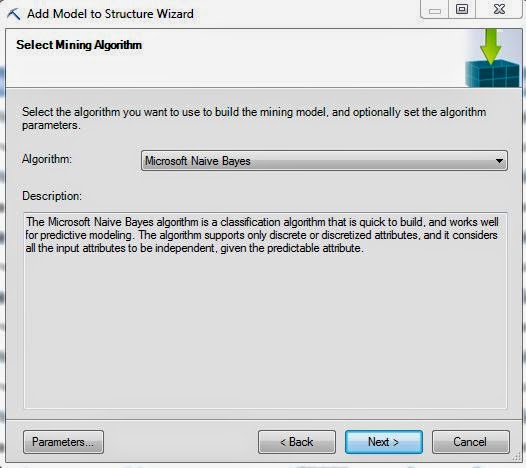
Select Algorithm
First, we need to select the Naive Bayes algorithm.  Before we move on, let's take a look at the Parameters.
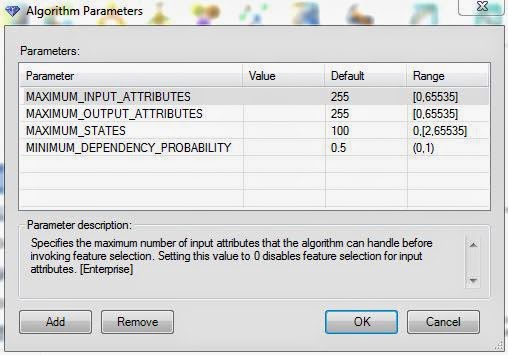
Parameters
Just like that with Logistic Regression, this algorithm have very few parameters.  In fact, the only parameter that actually affects the model is the Minimum Dependency Probability.  Altering this value will increase or decrease the number of predictors in the model.  For more information on these parameters, read this.  Let's move on.
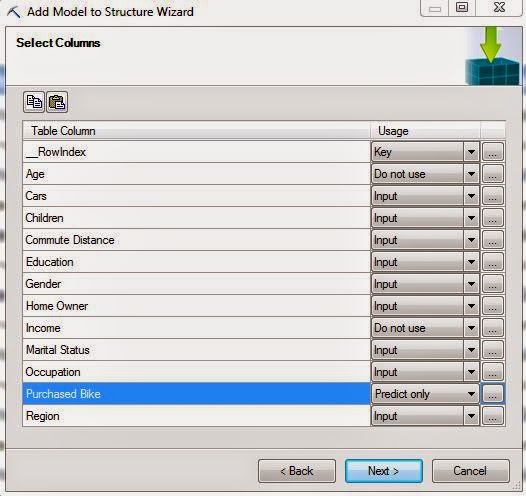
Select Columns
Since the structure has defined Age and Income as Continuous variables, this algorithm will not let us use them.  So, the only thing we need to change here is set Purchased Bike to "Predict Only".
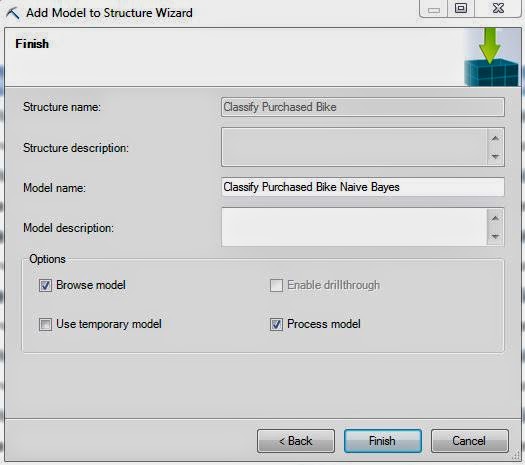
Create Model
Finally, we create our model using the naming convention we've been following for this entire series.  It's important to note that, just like Logistic Regression, this algorithm doesn't support drillthrough.  Let's jump to the output.
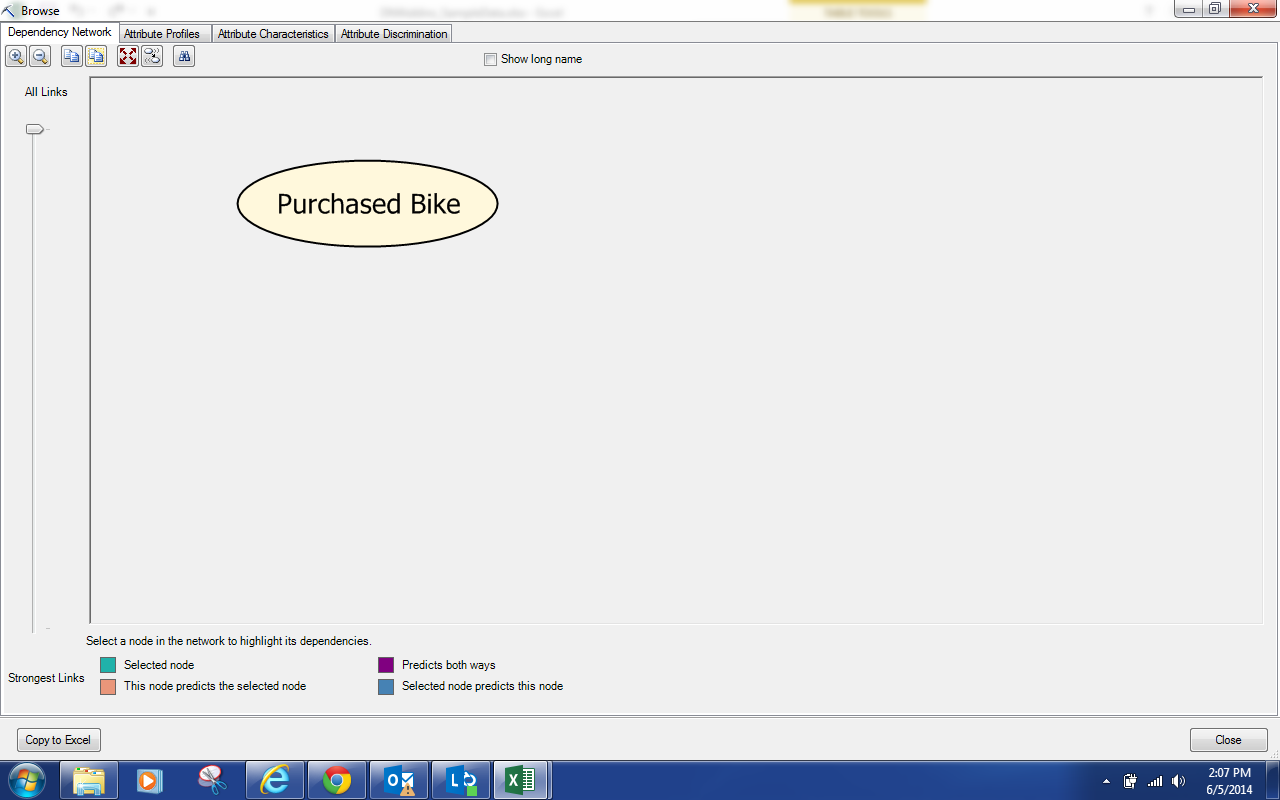
Dependency Network
Well, we have an issue already.  There are no variables in the model other than Purchased Bike.  This means that we can't predict values with this model.  This is very likely due to the fact that the best predictors are discretized versions of Income and Age.  To test this, let's create another structure that discretizes those values and use that for a new model.  For more information on how to create a mining structure, read this.
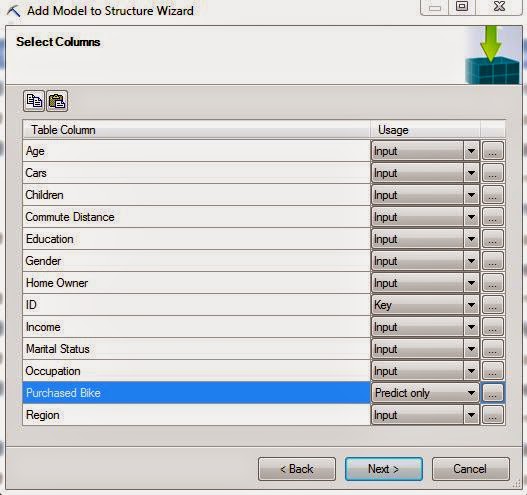
Select Columns (Discretized)
Notice how Age and Income are inputs now?  That's because they're no longer Continuous variables.  Let's check out this model.
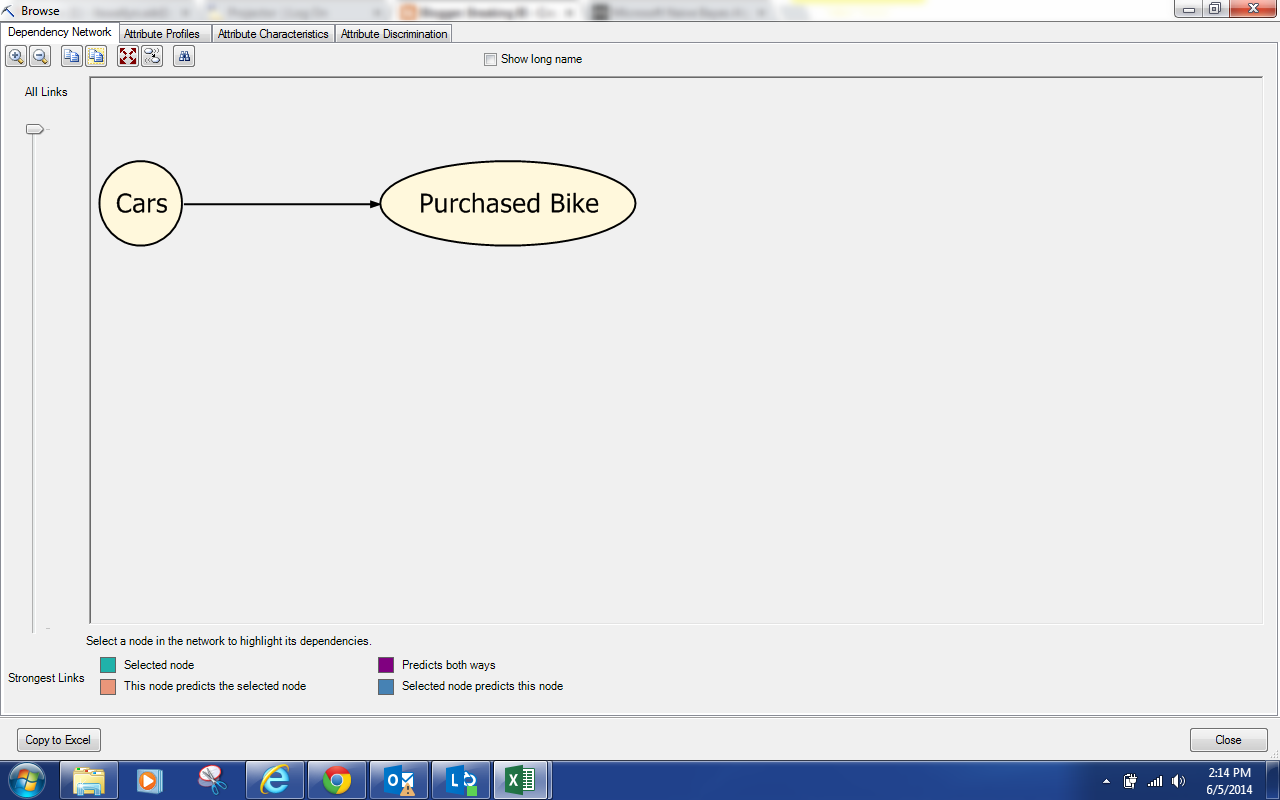
Dependency Network (Discretized)
For some reason, discretizing Age and Income cause Cars to become statistically significant.  This model is still pretty bare, let's change the parameters to get a fuller model.
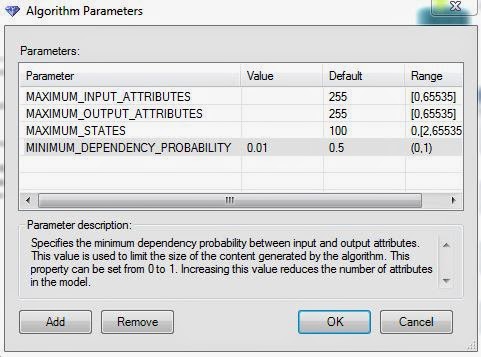
Parameters (.01 MDP)
We needed to reduce the Minimum Dependency Probability all the way to .01, which is almost as low as it can be, before we actually got any change in the model.  At this point, we're thoroughly convinced that this algorithm is not appropriate for this data set.  However, we'll continue the analysis as a demonstration.  Let's check out the model.
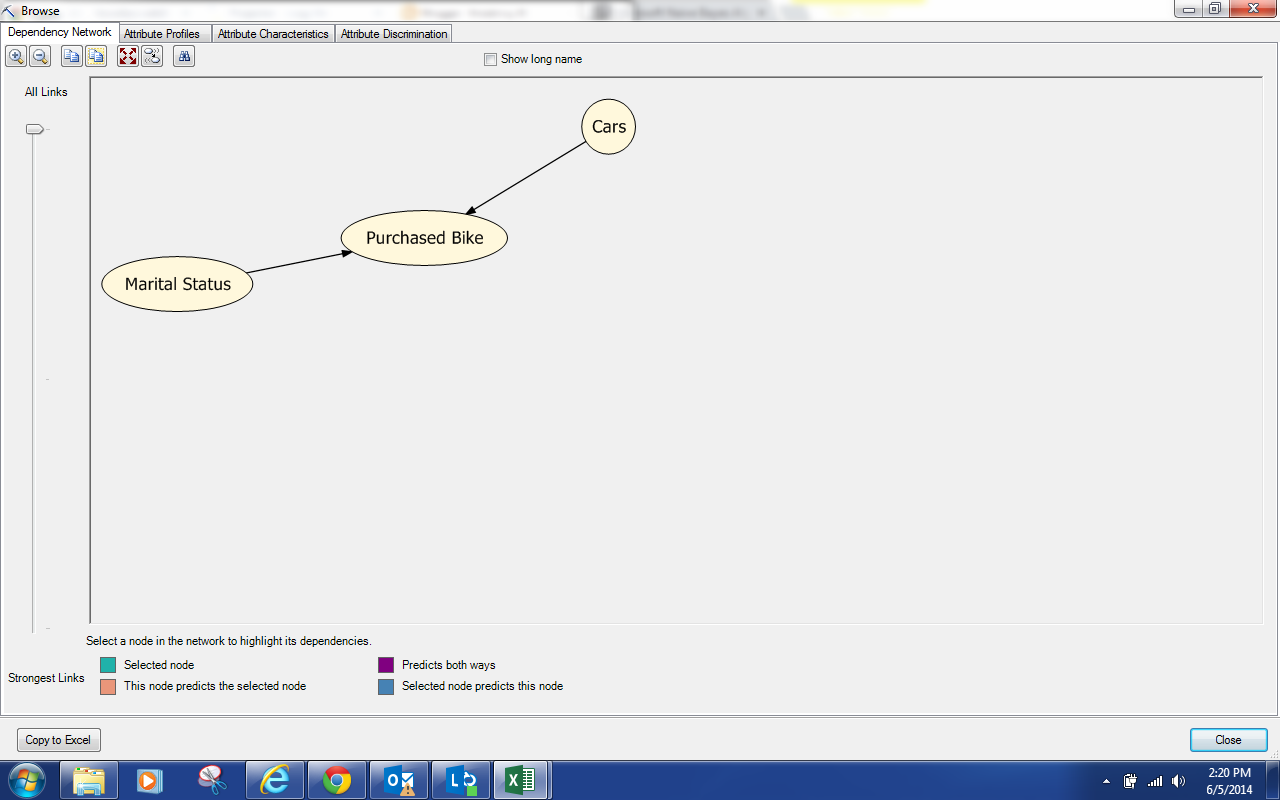
Dependency Network  (.01 MDP)
We see that Marital Status and Cars are predictors for Purchased Bike.  Next, let's jump over to Attribute Profiles.
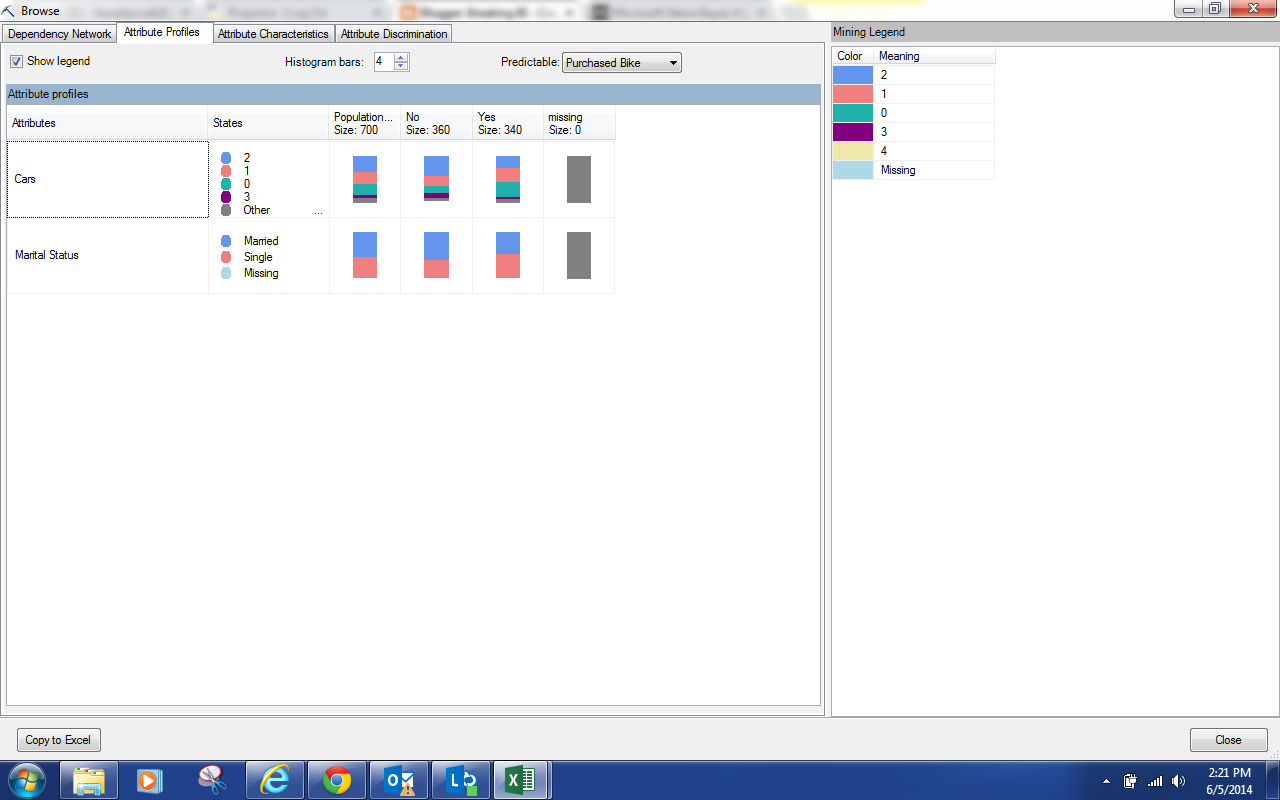
Attribute Profiles
We can see the breakdown of each predictor as it relates to each value of Purchased Bike.  The differences are pretty minor.  So, let's move on to the Attribute Characteristics.
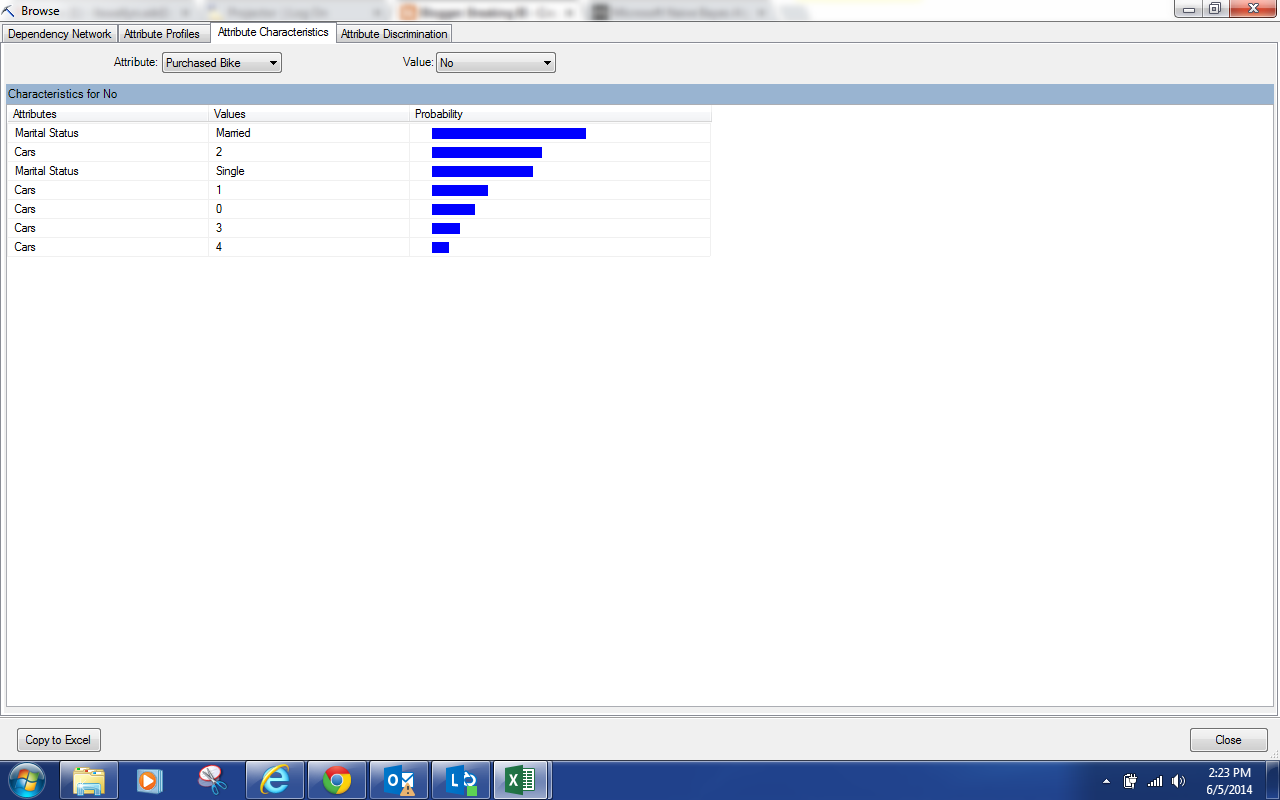
Attribute Characteristics
By now, you should have noticed that this is exactly the same type of output we saw for the Clustering Algorithm, albeit less useful because of the quality of the model.  This screen shows us what makes up each individual value of Purchased Bike.  However, we find the Attribute Discrimination to be much more useful.
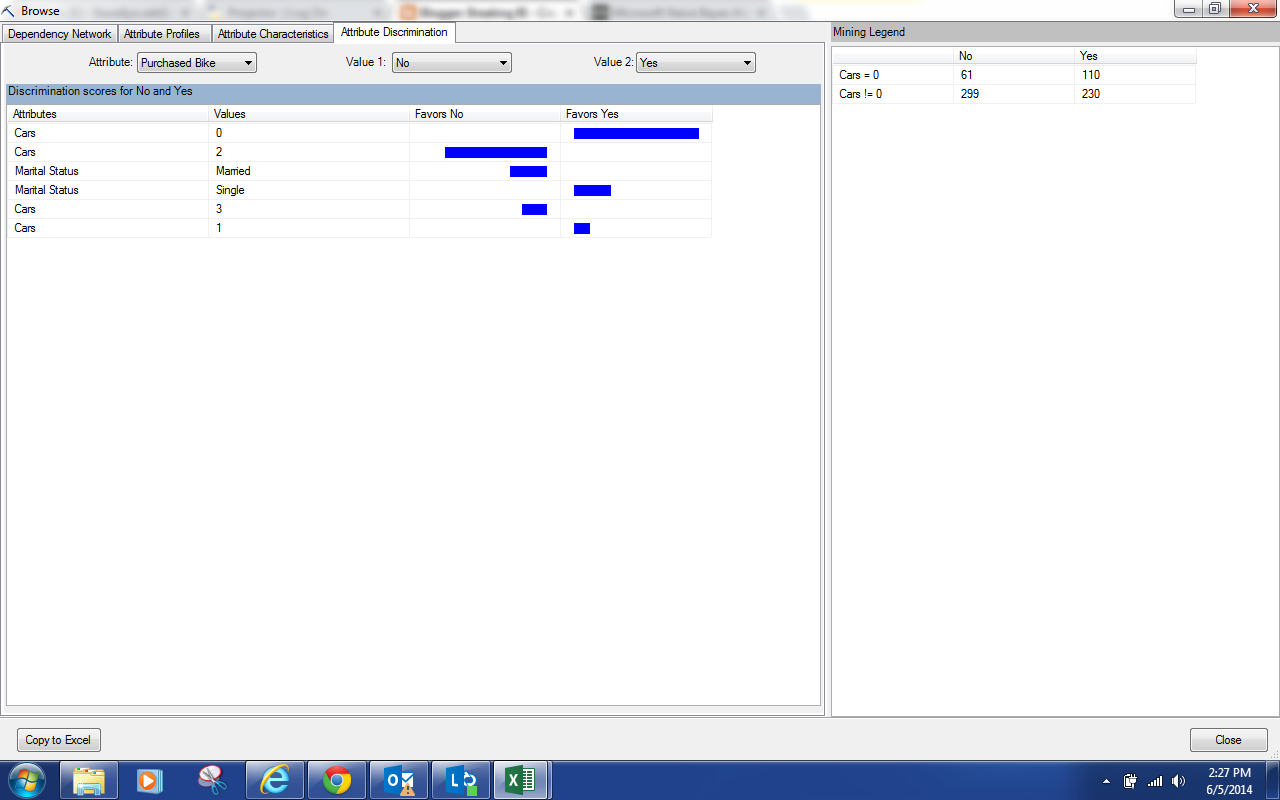
Attribute Discrimination
This view will show you what attributes correspond best with certain outcomes.  Not surprisingly, we see that people with no cars tend to buy bikes while people with 2 cars do not.  We also see that married people don't usually buy bikes while Single people do.

Just like with Logistic Regression, this algorithm is typically not as useful as Decision Trees.  However, it will typically perform better.  So, the goal is to see whether the increase processing and querying time for the more complex models actually yields better predictions.  In this case, the Decision Tree model is significantly better.  Keep an eye for the next post where we'll be talking about Neural Networks.  Thanks for reading.  We hope you found this informative.

Brad Llewellyn
Director, Consumer Sciences
Consumer Orbit
llewellyn.wb@gmail.com
http://www.linkedin.com/in/bradllewellyn